
A student entrepreneur’s life is constantly on the go, as one minute you are in the lecture hall taking notes and the next you are in a coffee shop managing the inventory of your startup.
When your office changes thrice a day, your gear should be equally adaptable. Your trade’s main tool is a laptop but its single screen limits your productivity. This is why many prefer portable monitors, as they maintain a professional workflow in the mobile world.
If you can relate to the situation and are searching for a similar tool, buy the Mobile Pixels portable monitor. They can elevate productivity and efficiency no matter your location. Eager to know more? This blog will cover the necessary details.
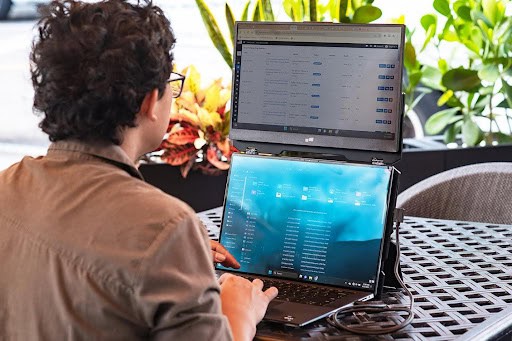
Table of Contents
Why Student Entrepreneurs Need More Than One Screen
Think about a typical Tuesday: you have a 9 AM lecture, a noon team sync on Zoom, and an evening pitch prep session.
Between all of this, you are also replying to supplier emails, checking your store analytics, and reviewing a legal document. A single laptop screen was simply not designed for this level of cognitive juggling.
Research from the University of Utah found that using dual monitors can improve productivity by up to 44% for tasks that require referencing multiple sources simultaneously. For a student entrepreneur, that kind of efficiency is not a luxury — it is a competitive edge.
The “Dual-Screen” Advantage
For student entrepreneurs, multitasking is a survival mechanism, not a choice. The traditional screen makes flipping between a research paper, a Zoom call, and a Shopify dashboard digitally exhausting. But a portable monitor encourages smarter multitasking.
Easy Research and Writing
Having an extra screen allows you to keep your primary source material or datasets open while you use the laptop to draft your business plan or essay. No more losing your place every time you switch tabs.
Makes Communication Seamless
A portable monitor lets you use Slack or email to respond to clients and team members in real-time, without getting distracted or losing focus on your main task.
Coding and Design
Does your venture involve creative or technical work? You need an extra screen to preview the live code while on the main laptop you edit it — making the entire process far less cramped and much more efficient.
Financial Tracking and Spreadsheets
Managing your startup’s budget while also tracking your academic calendar becomes significantly easier with two screens. Keep your accounting software or Google Sheets open on one display and your task management tool on the other. Your numbers stay visible, your deadlines stay manageable.

Provides Professionalism Everywhere
We understand your networking happens in student centers and local cafes as well, so consider a portable monitor as it allows you to turn any surface into a collaborative workspace.
Presentations on the Fly
There is no need to crowd around a single laptop, as this monitor allows you to share the screen with your investor. It creates a professional and engaging experience, where your client can also fully understand your idea.
You Can Compare
Unlike a single laptop, a portable monitor lets you compare pricing, supplier quotes, or contract terms side by side. This ability to view both documents simultaneously minimizes errors from constant tab-switching.
Client Calls Look More Credible
When you are on a video call and your workspace looks organized — with reference material on one screen and the call on another — you immediately come across as more prepared and professional. First impressions matter, even virtually.
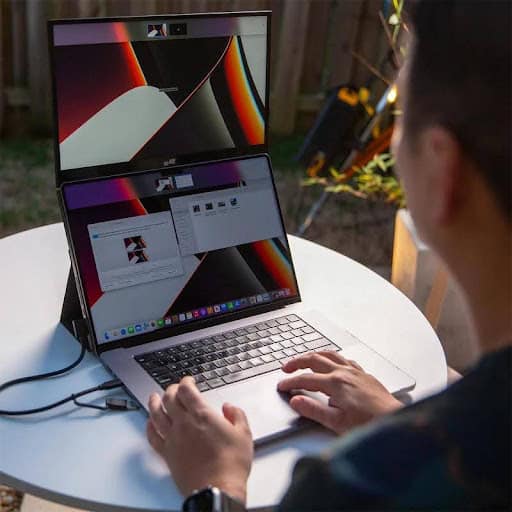
What to Look for in a Portable Monitor
Not all monitors are the same, especially when you are using them across campus. Therefore, keep the following features in mind:
USB-C Connectivity
Search for “Plug-and-Play” models, which draw power and data from a single USB-C cable. This reduces the weight and number of cables you would otherwise have to carry.
Weight and Slimness
If you do not want a backache, choose a model under two pounds. Many versions are thinner than a smartphone and fit comfortably into your regular laptop sleeve.
Matte or Glossy Screen
Where do you work most often? Brightly lit libraries or outdoors? You need a matte screen to view documents clearly and to reduce eye strain during long sessions.
Built-in Kickstands
Select models with built-in kickstands for better stability and a wider range of viewing angles. This is especially useful when you are working on uneven cafe tables or cramped library desks.
Screen Size and Resolution
A screen between 13 and 15.6 inches hits the sweet spot for portability and usability. Full HD (1920×1080) resolution provides sharp, clear visuals without draining your battery or straining your eyes over long work sessions.
Compatibility
Make sure the monitor you choose is compatible with your operating system — whether that is Windows, macOS, or Chrome OS. Mobile Pixels monitors are designed for broad compatibility, so they integrate seamlessly into your existing setup without driver headaches.
Balance the Budget and the Business
Being a student, every dollar counts. High-end 4K monitors look tempting, but pick a Full HD display for elevated productivity. It delivers accurate colors and clarity without draining your budget or battery.
Purchasing a portable monitor is also a legitimate business expense. If your startup is registered, it may even be tax-deductible — check with your university’s entrepreneurship office or a financial advisor for guidance.
This extra screen reduces the mental load of managing multiple tabs, allowing you to finish schoolwork faster and dedicate real, focused time to growing your business.
How Mobile Pixels Stands Out
Mobile Pixels has built a strong reputation among remote workers, digital nomads, and — increasingly — student entrepreneurs. Here is what makes their monitors a standout choice:
- Ultra-slim design that slips into any bag without adding bulk
- Single-cable setup via USB-C for a truly plug-and-play experience
- Auto-rotate feature on select models that detects orientation and adjusts the display
- Wide compatibility with Windows, macOS, Android, and more
- Multiple models catering to different screen size and budget needs
Whether you are in a library study room, a startup incubator, or your dorm, Mobile Pixels delivers consistent, professional-grade screen real estate.
Build Your Mobile Office
The transition from student to business owner rests on efficiency. Simply add a portable monitor to your primary setup to increase your ability to see the bigger picture — literally and figuratively — regardless of your location.
Your time is split between assignments, meetings, pitches, and operations. A second screen does not just help you do more — it helps you do more without burning out. That alone makes it one of the smartest investments you can make as a student entrepreneur.
Buy it today and see how it transforms your journey toward becoming the best version of a student entrepreneur.
Frequently Asked Questions (FAQ)
Are portable monitors worth it for students?
Yes — especially for students who are also running a business. A portable monitor dramatically reduces the time you spend switching between tabs, which means you can complete tasks faster and with fewer errors. The productivity gains far outweigh the one-time cost.
Do portable monitors work with all laptops?
Most modern portable monitors, including those from Mobile Pixels, are compatible with laptops running Windows, macOS, and Chrome OS. Always verify USB-C or HDMI compatibility with your specific laptop model before purchasing.
How much should I spend on a portable monitor as a student?
You do not need to spend a fortune. A Full HD portable monitor in the $100–$200 range delivers excellent value. Avoid overspending on 4K displays unless your work is specifically design- or video-focused, as they also consume more battery.
Can I use a portable monitor without a power outlet?
Yes. Most USB-C portable monitors draw power directly from your laptop, which means no separate power cable or wall socket is needed. This makes them ideal for working in cafes, libraries, or transit.
How heavy is a portable monitor?
Most quality portable monitors weigh between 1.5 and 2.2 pounds. Many models are thinner than a standard smartphone and slide easily into a laptop sleeve or padded bag compartment.
Is a matte screen better than a glossy screen for students?
For most student environments — classrooms, libraries, and cafes — a matte screen is the better choice. It reduces glare from overhead lighting and windows, making text easier to read and reducing eye fatigue over long work sessions.
Can I use a portable monitor for video calls and presentations?
Absolutely. A portable monitor is excellent for Zoom or Google Meet calls — keep the video call on one screen while referencing notes or a presentation on the other. It also allows you to share your screen with an investor or client without crowding around a single small display.
What is the best portable monitor for student entrepreneurs?
Mobile Pixels portable monitors are among the top-rated options for student entrepreneurs due to their lightweight build, single-cable setup, and wide device compatibility. They are purpose-built for people who move constantly and need reliable screen performance everywhere they go.
Do I need any special software to set up a portable monitor?
No special software is required for most portable monitors. Plug-and-Play models automatically register as an extended display when connected via USB-C or HDMI. Some models offer optional companion apps for additional display customization.
Can a portable monitor damage my laptop battery?
A USB-C portable monitor does draw power from your laptop, which will reduce battery runtime. To manage this, lower your monitor’s brightness settings and close unnecessary background apps. Carrying a power bank or working near an outlet when possible helps extend your session.
Final Thoughts on Portable Monitors for Student Entrepreneurs
The life of a student entrepreneur is anything but ordinary — and your tools should reflect that. A portable monitor is not just a gadget; it is a productivity system that travels with you from the lecture hall to the coffee shop to the boardroom. It gives you the screen space to think bigger, work smarter, and present with confidence no matter where you are. If you are serious about building something while still crushing your academics, the Mobile Pixels portable monitor is the upgrade your hustle deserves. Stop squinting at a single screen and start working the way successful entrepreneurs do — grab yours today.





Informative and clear.
Glad to hear that, thanks!